v0.3-Beta ยท FREE DOWNLOAD

Your AI Race Engineer.
Live. Every Lap.

MTEL brings real-time AI voice coaching, post-session analysis, and professional-grade telemetry to your iRacing setup โ€” completely free during Beta.

AI Voice Coach
60Hz Telemetry
100% Free Beta
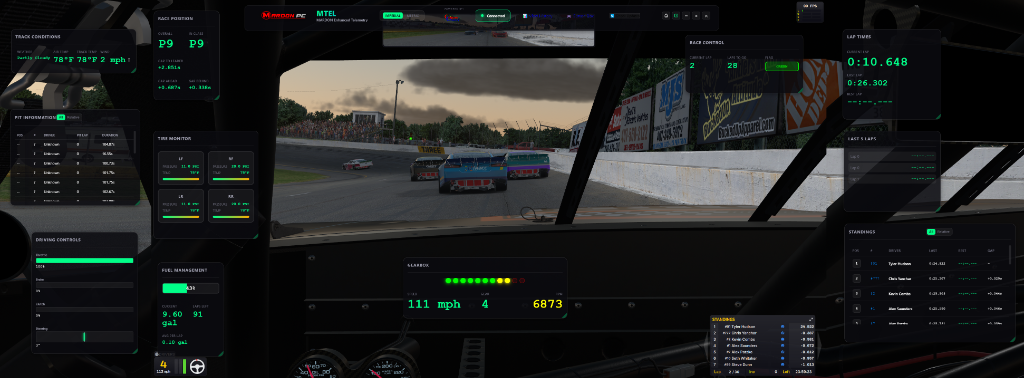
MTEL Dashboard Overlay

Everything You Need to Go Faster

Professional-grade tools trusted by serious iRacing competitors

๐Ÿค–

AI Voice Coach

Real-time coaching tips delivered by voice during your session. Corner entry, tire wear, lap delta, and more โ€” all spoken by your AI race engineer.

๐Ÿ“‹

AI Session Analysis

Comprehensive post-session reports powered by Gemini AI. Lap progression, corner entry/exit analysis, throttle trace review, and setup recommendations.

๐Ÿ“Š

Real-Time Telemetry

Live data streaming from iRacing at 60Hz. Monitor tire temps, fuel levels, lap times, sector splits, and standings โ€” all in one overlay.

๐Ÿ

Race Strategy

Advanced fuel calculations, pit stop optimization, and tire wear analysis to plan your perfect race strategy in real time.

๐Ÿ“ˆ

Historical Analytics

Track your progress over time with detailed lap history, performance trends, and session comparisons across tracks and cars.

๐ŸŽฎ

Button Box Integration

Control MTEL and iRacing functions with custom button box support via tablet or phone โ€” no extra hardware required.

๐ŸŽจ

Customizable UI

Drag, resize, and arrange cards to create your perfect dashboard layout. Full overlay mode with lock for distraction-free racing.

โšก

Lightweight & Fast

Minimal CPU and memory footprint. MTEL runs silently in the background without impacting your FPS or race performance.

POWERED BY GEMINI AI

Your Personal Race Engineer, On Every Lap

MTEL's AI engine analyzes your driving in real time and delivers actionable coaching โ€” not generic tips

๐ŸŽ™๏ธ

AI Voice Coach

Real-Time ยท During Session

The AI Voice Coach listens to your lap data as you drive and delivers spoken coaching between laps. It tracks tire wear trends, lap time deltas, corner entry consistency, and throttle application โ€” then tells you exactly what to adjust.

  • ๐Ÿ“ Corner entry speed & brake point feedback
  • ๐Ÿ”ฅ Tire wear and fall-off detection
  • โฑ๏ธ Lap delta vs. personal best
  • ๐ŸŒ€ Oversteer / understeer pattern recognition
  • โ›ฝ Fuel and pit strategy alerts
"You're carrying too much speed into the braking zones โ€” initiate your braking phase slightly earlier with a touch more pressure to improve car rotation." โ€” MTEL AI Coach, live during session
๐Ÿ“Š

AI Session Analysis

Post-Session ยท Comprehensive Report

After each session, MTEL generates a full coaching report โ€” not a summary. The AI analyzes your recorded telemetry frame-by-frame and produces a professional debrief as if your race engineer was sitting next to you.

  • ๐Ÿ“ˆ Lap-by-lap progression analysis
  • ๐Ÿ”„ Corner entry and exit technique breakdown
  • ๐Ÿ›ž Throttle & brake trace visualization
  • โš™๏ธ Setup change recommendations with physics reasoning
  • ๐ŸŽ๏ธ Tyre management strategy advice
"Your best lap of 0:18.322 was achieved on Lap 24. The throttle trace shows a significant improvement in exit speed from Lap 20 onwards โ€” this should be your reference lap for consistency." โ€” MTEL AI Session Report
๐Ÿง  Gemini 2.5 AI Model
โšก <2s Coaching Response
๐Ÿ“„ 9 Sections Analysis Report
๐ŸŽ™๏ธ Voice Real-Time Delivery
FREE ยท NO KEY REQUIRED

Download MTEL v0.3-Beta

MTEL is free to download and use during the Beta period. No license key, no waiting list โ€” just download, install, and start racing smarter.

  • โœ“ Full AI Voice Coach included
  • โœ“ Complete AI Session Analysis reports
  • โœ“ All telemetry and strategy features unlocked
  • โœ“ No credit card or account required
  • โœ“ Beta testers receive priority access at launch
Download Free โ€” v0.3-Beta
MTEL v0.3-Beta Free Access
NO KEY REQUIRED
Access Level Full Features
AI Coaching Included
Platform Windows 10/11

Powered by